My Vim setup
The following lines are in my .vimrc file and make working with Vim all the better!
I keep it pretty basic, so I don't use the very popular fugitive.vim or NERDTree plugin.
Put these lines in ~/.vimrc or /etc/vim/vimrc (depending on your distro, sometimes they are already there but need to be uncommented), and you're good to go.
As for a font, I like the Liberation Mono font (11pt).
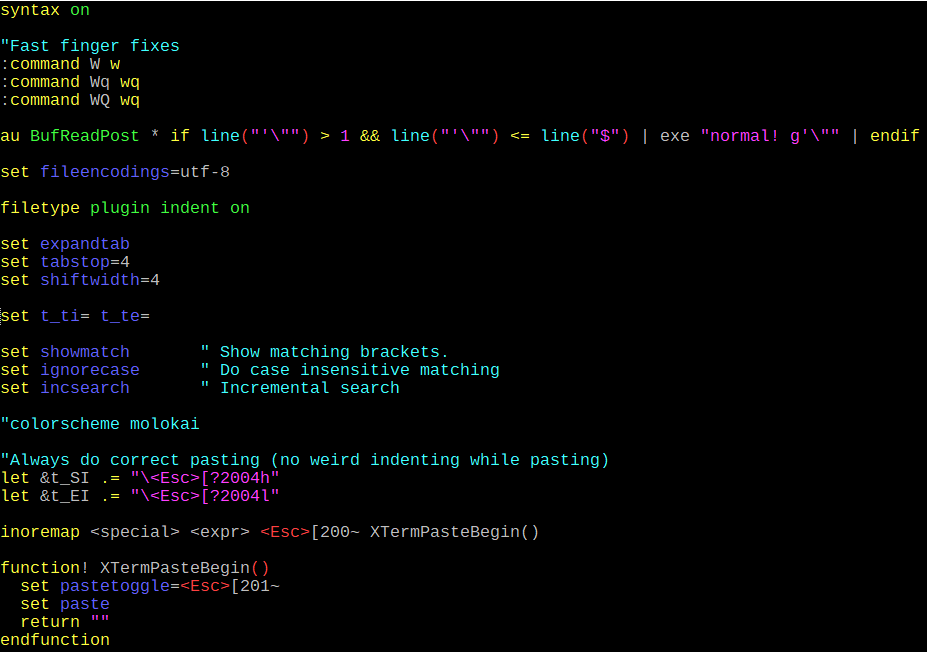 My .vimrc file
Explanation
:command W w
:command Wq wq
:command WQ wq
I mapped these key combinations so when I type too fast and make mistakes; Vim still does what I want it to do (save or save & quit).
syntax onSome people don't like syntax highlighting, I do.
au BufReadPost * if line("'\"") > 1 && line("'\"") <= line("$") | exe "normal! g'\"" | endifThis is the most complicated line in the config, but probably also most useful! When you re-open a file your cursor will be where you left of. Indispensable.
set fileencodings=utf-8UTF-8 all the things, yes please.
filetype plugin indent onThis is the only (non-default) plugin I use. It is actually a combination of commands, but most importantly it will try to recognize filetypes and apply file specific settings (e.g. syntax highlighting)
set expandtab
set tabstop=4
set shiftwidth=4
Ok, now we're entering dangerous territory. I actually like tabs, but spaces are more file friendly/portable. So why not 'map' the tab to four spaces? With these three settings, I can use tabs, but Vim will enter 4 spaces and everbody wins.
set t_ti= t_te=Normally when you exit Vim, the screen will clear, and you will be back to the prompt as if nothing happened. I don't like this, I want to see whatever it was that I was working on. With this setting I return to the prompt and see the Vim screen above.
set showmatch " Show matching brackets.You want this. Especially with bracket hungry languages like PHP. Stop searching for a brackets/parentheses, Vim will highlight the matching pairs.
set ignorecase " Do case insensitive matchingInsensitive matching is the best, I don't have to worry how something was spelled when searching for words.
set incsearch " Incremental searchWhen searching through a file (/) the cursor will move while typing. For some this may be disorienting, but you will find what you're looking for with less typing.
colorscheme molokaiVim comes with somepreinstalled colorschemes, I tend to likemolokai. It is clean, crisp, non-intrusive even on a xterm-256 terminal emulator. When I switched servers, I switched the color scheme back to default. But molokai is still pretty nice.