Jitsi finetuning and customization
Jitsi offers a great user experience because it doesn't require an account, you just go to a Chrome URL and you're pretty much good to go. You get a full blown video chat environment: complete with gridview, screensharingand chatoptions. No add ons or third party installations needed. I greatly prefer this instead of Zoom, Google Hangouts or Microsoft Teams or what have you.
Jitsi is also a great piece of software to host. And installing and hosting your own video software conferencing software has never been easier.
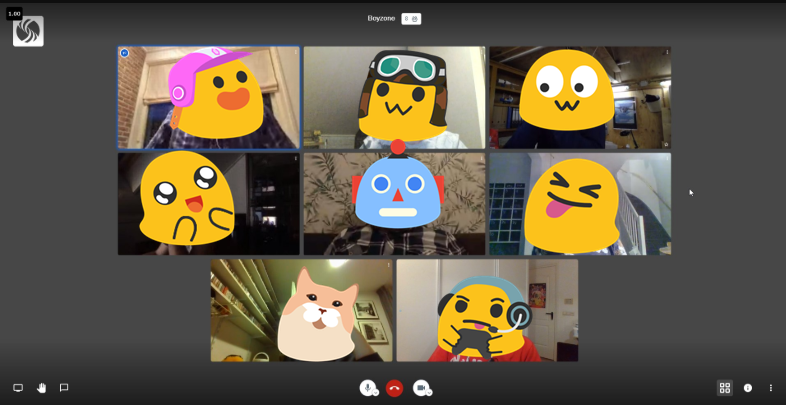 Chatting with 8 people. No problem. Emojis added for privacy (not a Jitsi feature, yet)
Here are some tips to run the Jitsi stack smoothly on your server and how to customize Jitsi Meet.
Tips
- Put Ngnix in front of Jitsi. This helps to handle the bulk of the web requests. Otherwise Java will take care of this, and this is not what Java is particularly good at.
- Use JRE11 to run jicofo and jitsi-videobridge2. The latest Debian 10 (Buster) comes with both JRE8 and JRE11. Make sure to use JRE11. This made quite a bit of difference in our tests.
ii openjdk-11-jre-headless:amd64 11.0.7+10-2ubuntu2~18.04 amd64 OpenJDK Java runtime, using Hotspot JIT (headless)- Always use the latest Jitsi packages. They get updated quite frequently, and you definitely want the latest. E.g. last Friday the latest release had a bug, this was fixed the same day. So make sure you always run the latest version.
root@meet01:/# cat /etc/apt/sources.list.d/jitsi-stable.list
deb https://download.jitsi.org stable/
We run the following packages.
ii jitsi-meet 2.0.4548-1 all WebRTC JavaScript video conferences
ii jitsi-meet-prosody 1.0.4074-1 all Prosody configuration for Jitsi Meet
ii jitsi-meet-turnserver 1.0.4074-1 all Configures coturn to be used with Jitsi Meet
ii jitsi-meet-web 1.0.4074-1 all WebRTC JavaScript video conferences
ii jitsi-meet-web-config 1.0.4074-1 all Configuration for web serving of Jitsi Meet
ii jitsi-videobridge2 2.1-197-g38256192-1 all WebRTC compatible Selective Forwarding Unit (SFU)- Running from package also has the benefit that the package maintainers tune several kernel parameters specifically for video chat with the installation. You definitely want this.
Other tips
With all of the above you should be good to go. The following two tips are optional and more user specific, if you still run into (bandwidth) issues.
- Ask clients to scale their video quality to low definition. There is a server wide setting that should theoretically be able to enforce this, but I have not been able to get this to work.
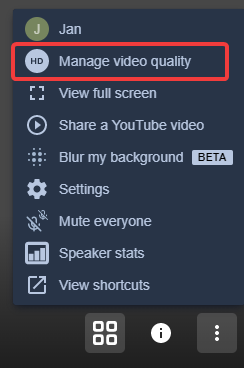
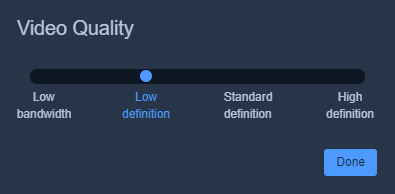
- Use Chrome. Jitsi does not work on Safari at all, but should work just fine on Firefox. However it seems specifically designed for Chrome. In my experience: when everyone is on Chrome, Jitsi Meet seems to work best.
Customizing Jitsi Meet
Every time you upgrade your Jitsi packages, all your custom changes will be overwritten. You can [run this script](#Run this after a Jitsi upgrade cp -ripv own-favicon.ico /usr/share/jitsi-meet/images/favicon.icocp -ripv own-watermark.png /usr/share/jitsi-meet/images/watermark.png sed -i 's/Secure, fully featured, and completely free video conferencing/REPLACE THIS WITH YOUR TITLE TEXT/g' /usr/share/jitsi-meet/libs/app.bundle.min.js sed -i 's/Go ahead, video chat with the whole team. In fact, invite everyone you know. {{app}} is a fully encrypted, 100% open source video conferencing solution that you can use all day, every day, for free — with no account needed./REPLACE THIS WITH YOUR OWN WELCOME TEXT/g' /usr/share/jitsi-meet/libs/app.bundle.min.js sed -i 's/Start a new meeting/REPLACE THIS WITH YOUR OWN TEXT/g' /usr/share/jitsi-meet/libs/app.bundle.min.js sed -i 's/jitsi.org/yourowndomain.com/g' /usr/share/jitsi-meet/interface_config.jssed -i 's/Jitsi Meet/YOUR OWN TITLE/g' /usr/share/jitsi-meet/interface_config.js /etc/init.d/jicofo restart && /etc/init.d/jitsi-videobridge2 restart && /etc/init.d/nginx restart && /etc/init.d/prosody restart) after every upgrade to change your personal settings. Please change appropriate settings for your installation.
#Run this after a Jitsi upgrade

cp -ripv own-favicon.ico /usr/share/jitsi-meet/images/favicon.ico
cp -ripv own-watermark.png /usr/share/jitsi-meet/images/watermark.png

sed -i 's/Secure, fully featured, and completely free video conferencing/REPLACE THIS WITH YOUR TITLE TEXT/g' /usr/share/jitsi-meet/libs/app.bundle.min.js

sed -i 's/Go ahead, video chat with the whole team. In fact, invite everyone you know. {{app}} is a fully encrypted, 100% open source video conferencing solution that you can use all day, every day, for free — with no account needed./REPLACE THIS WITH YOUR OWN WELCOME TEXT/g' /usr/share/jitsi-meet/libs/app.bundle.min.js

sed -i 's/Start a new meeting/REPLACE THIS WITH YOUR OWN TEXT/g' /usr/share/jitsi-meet/libs/app.bundle.min.js

sed -i 's/jitsi.org/yourowndomain.com/g' /usr/share/jitsi-meet/interface_config.js

sed -i 's/Jitsi Meet/YOUR OWN TITLE/g' /usr/share/jitsi-meet/interface_config.js

/etc/init.d/jicofo restart && /etc/init.d/jitsi-videobridge2 restart && /etc/init.d/nginx restart && /etc/init.d/prosody restart